Controls
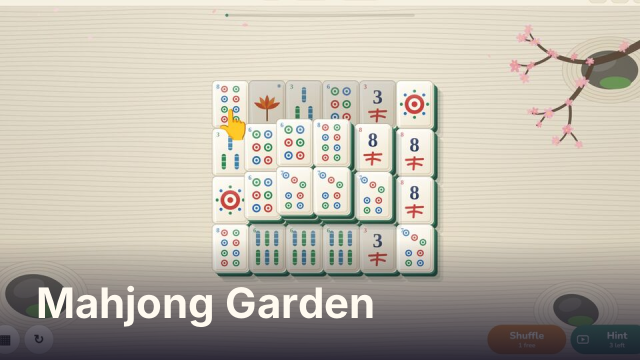
Tap or click two matching free tiles to remove them. The buttons along the bottom open the garden list, restart the level, shuffle the tiles and show a hint. Keys: arrows move between tiles, Space or Enter selects, H shows a hint, S shuffles, R restarts the level. P or Esc pauses.
How to play Mahjong Garden
The tiles are stacked in a layout, some of them several layers high. Pick two tiles with the same face and both are removed. Any two flower tiles count as a match, and so do any two season tiles. Clear every tile to finish the garden.
Only free tiles can be picked. A tile is free when nothing lies on top of it and at least one of its long sides, left or right, is open. Tiles that are blocked look slightly shaded. If no free pairs are left, the game offers a shuffle of the remaining tiles, or you can restart the level.
Sixty gardens
There are 60 layouts, from small ones like Pebble and Stepping Stones to large stacks such as the Fortress, Phoenix, Moon Gate and the classic Turtle. They are ordered by size, so the boards grow as you go, and each cleared garden opens the next. The scenery moves through the four seasons from one garden to the next, with falling blossom, green leaves, autumn color and snow.
Every deal is built backward from a full solution, and every shuffle is checked the same way, so a board can always be cleared. Finish without hints or paid shuffles, within a par time for the layout, to earn all three stars.
Tips and tricks
- Free the tall stacks first. Tiles hidden under several layers are the ones that leave you stuck at the end.
- When three or four copies of a face are free, choose the pair that uncovers more tiles.
- Open up the ends of long rows early. A row only frees one tile at a time from each side.
- Each level has one free shuffle. After that, and for up to three hints per level, you can watch a short ad. Skip it and you get nothing, but the button stays so you can try again.
FAQ
Is Mahjong Garden free?
Yes. It is free to play in your browser, with no download and no account.
Can I play on a phone or tablet?
Yes. Tap two matching tiles. The board scales to fit your screen, and turning a phone sideways gives the bigger layouts more room.
Why can I not pick this tile?
It is blocked. A tile is only free when nothing sits on top of it and its left or right side is open. Blocked tiles are drawn slightly shaded.
Is my progress saved?
Your unlocked gardens and stars are saved in your browser on this device, along with the board you are in the middle of.