Controls
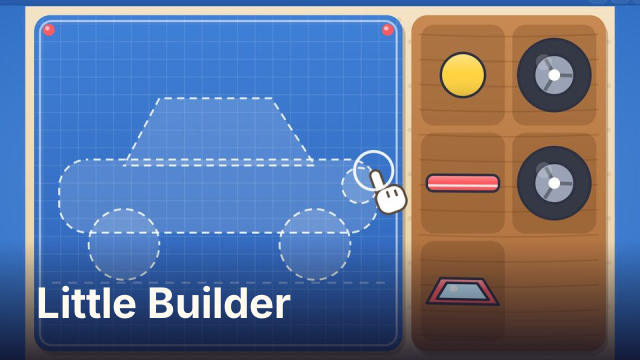
Drag each part from the tray onto its glowing spot on the blueprint. Tap a paint pot, then tap a part to color it, and tap GO to send the vehicle off. Tap the horn button to honk. Keys: arrows choose a part, Space or Enter places it; while painting, 1 to 6 pick a color, arrows choose a part, Space paints it, Enter or G starts the ride; H, Space or Enter honks during the ride. P or Esc pauses.
How to play Little Builder
Each round starts with an outline of a vehicle and a tray of big, chunky parts. Your child drags a part onto the spot where it fits and it clicks into place. A part dropped in the wrong place slides back to the tray, so there is nothing to get wrong, only another try.
Once every part is on, the paint pots appear. Tap a color, then tap a part. Tapping the same color again on a part adds a pattern of spots, stars, hearts or zig-zags. Press GO and the vehicle drives, flies or sails through its own little scene, with a horn button to honk on the way.
Parts packs and the garage
There are 27 vehicles in three packs of nine. The Road pack is open from the start, with the car, bus, fire truck, tractor, train, police car and more. The Sky and Sea pack, with planes, boats, a submarine and a hot-air balloon, opens after six finished builds. The Space and Build pack has rockets, a moon rover and diggers.
Every finished vehicle goes into the garage in the colors your child picked, so they can look back at what they made. The garage keeps the last 30 builds. There is no timer, no score to chase and no way to lose.
Tips for grown-ups
- Talk through the build: which part is the wheel, which one is the window. The shape is the puzzle, the words are a bonus.
- Let them experiment with paint. A part can be repainted as many times as they like before pressing GO.
- The keyboard controls help a child who finds dragging hard: arrows pick a part and Space puts it in place.
- The Space and Build pack sits behind a short ad in the packs menu, under a note for grown-ups. Skip the ad and the pack stays locked, but the button stays so you can try again.
FAQ
Is Little Builder free?
Yes. It is free to play in your browser, with no download and no account.
Can I play on a phone or tablet?
Yes. It is made for small fingers: drag the big parts, tap the paint pots and tap GO. The layout fits a phone in portrait or landscape.
Is it for young children?
Yes. It is a calm building and coloring game with no time limit, no fail state and no reading needed to play. The game's own ad setting is marked child-directed.
Is my progress saved?
The number of builds, the garage, the pack you were using and whether the Space and Build pack is unlocked are saved in your browser on this device.