Controls
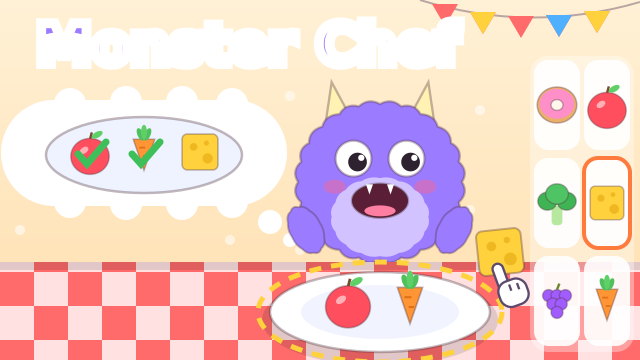
Drag a food from the shelf onto the plate, or just tap or click it to send it there. Tap the shirt button at the top to choose a monster and a table. On a keyboard, the arrow keys move an orange outline around the six shelf boxes and Space or Enter sends the outlined food to the plate. P or Esc pauses.
How to play Monster Chef
A fuzzy monster sits at the table and dreams about its dinner. The thought bubble above its head shows a picture recipe, and a shelf with six boxes holds the foods. Your child drags or taps the foods from the recipe onto the plate. The monster’s eyes follow the food, and it opens its mouth when your child picks up something it wants. Each right food lands on the plate with a happy note and gets a green check in the bubble.
A wrong food is no problem: it bounces back to the shelf and the monster giggles. There is no timer, no score and no game over. When the plate is full, the monster gobbles everything up, confetti flies and the next dish begins. On the first dish, on the first stacked dish and whenever your child stops for a few seconds, an animated hand shows which food to move.
Dishes, monsters and tables
Most dishes are a plate of separate foods such as apples, cheese, carrots, grapes, cookies or eggs, and they can go on in any order. Every other dish from the third one is a stack: a burger, a sandwich, a pancake tower or a layer cake. Stacks are built from the bottom up, and a moving arrow in the bubble points at the layer that comes next. The first dish needs 2 foods, and recipes slowly grow to 6.
There are 8 monsters and 5 table designs. Your child starts with one monster, gets a new monster every 2 finished dishes and a new table every 3 dishes, so everything is open after 14 dishes. The shirt button opens the wardrobe, where your child picks any unlocked monster and table. The counter at the top shows how many dishes are done.
Tips and tricks
- Name the foods in the bubble together and count how many of each the monster wants.
- For burgers and cakes, talk about what goes first, next and last before your child starts.
- Let your child try freely. A wrong food only bounces back, and the helping hand appears if they get stuck.
- The speaker button turns the sound off. The game pauses with the pause button, P or Esc, and also pauses by itself when you switch to another tab.
- The dish screen and the wardrobe can show an Unlock new monster button that plays a short ad and opens the next locked monster right away. If the ad does not finish, nothing is unlocked and the button can be tried again. It goes away once all 8 monsters are open, so stay close if your child is tapping on their own.
FAQ
Is Monster Chef free?
Yes. It is free to play in your browser, with no download and no account.
Can my child play on a phone or tablet?
Yes. Your child only needs to tap or drag the foods. The layout works in portrait, with the shelf under the plate, and in landscape, with the shelf on the right.
What does my child learn?
Matching foods to a picture, counting how many of each are needed and putting layers in the right order for burgers, sandwiches, pancakes and cakes. A wrong choice simply bounces back, so there is no way to fail.
Is my progress saved?
The number of dishes finished, the unlocked monsters, the chosen monster and table and the sound setting are saved in your browser on this device.