Controls
Tap or click the stars in number order, or slide a finger or the mouse from star to star. To paint, tap a color, tap a part of the picture, then tap the green tick when done. On a keyboard, Space or Enter joins the next star; when painting, the Left and Right arrows pick a color, Up, Down or Tab move a dotted outline between parts, Space paints the outlined part and Enter finishes. P or Esc pauses.
How to play Star Painter
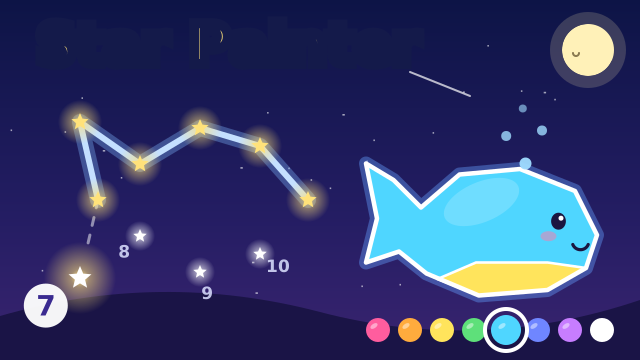
Each picture starts as a set of white stars in a night sky. The next star to join pulses and shows its number in a big circle, so your child always knows where to go. A tap on that star, or a slide of the finger across it, draws a glowing line with a soft note. Wrong taps only make a small sparkle. When the last star is joined, the shape lights up as a glowing picture and travels across the screen: the fish swims, the rocket blasts off, the car drives and the butterfly flutters.
Next comes painting. Your child picks one of 8 colors and taps a part of the picture to fill it. Parts can be painted again in a new color. The green tick ends the picture with confetti and a little parade. There is no timer and no game over, and a helping hand appears whenever your child waits a few seconds.
Pictures, packs and what your child practices
There are 24 pictures in 3 packs of 8, among them a house, a fish, a rocket, a sailboat, a whale, a butterfly, a train, a crown, an owl and a castle. Pictures use anywhere from 7 to 22 stars, so later ones ask your child to follow the numbers further. The first pack is open from the start. The second pack opens after 5 finished pictures. The third pack opens only from the pictures screen, with an optional short ad.
Along the way your child practices counting in order, recognizing numbers, steady finger control and naming colors. Every finished picture earns a three-star cheer and is kept with its colors. Tap the picture chip at the top during a round to see all packs, check finished pictures and pick any open picture to play or paint again.
Tips and tricks
- Read each big number out loud together before your child taps the star.
- Ask what the stars might turn into before the last one is joined.
- When painting, name the color before your child taps it, and try a different color for each part.
- The star chip at the top counts finished pictures. Five of them open the second pack.
- The speaker button turns the sound off. The game pauses with the pause button, P or Esc, and also pauses by itself when you switch to another tab.
- On the pictures screen, the Unlock picture pack (ad) button plays a short ad and opens the third pack for good. If the ad is not watched to the end, nothing unlocks, but the button stays there for another try, so stay close if your child is tapping on their own.
FAQ
Is Star Painter free?
Yes. It is free to play in your browser, with no download and no account.
Can my child play on a phone or tablet?
Yes. Your child only needs to tap or slide a finger over the stars and tap colors. It works in portrait and landscape.
How do more pictures unlock?
The first 8 pictures are open from the start. The next 8 open after your child finishes 5 pictures. The last 8 open from the pictures screen by watching a short ad, and stay open after that.
Is my progress saved?
Finished pictures and their colors, the picture your child was on, whether the third pack is open and the sound setting are saved in your browser on this device.