Controls
Tap or click a bubble to pop it. On a keyboard, the arrow keys move a dotted ring from bubble to bubble and Space or Enter pops the circled one. Tap the sticker book at the top to open the album. P or Esc pauses.
How to play Bubble Zoo
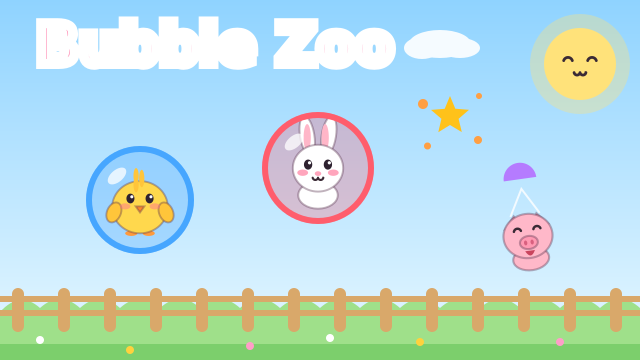
Bubbles float up from a sunny meadow, and every bubble has a baby animal inside: a chick, bunny, piglet, puppy, kitten, duckling, fox or panda. A big card at the top of the screen shows what to pop. When your child taps a right bubble, it pops with a soft musical note and the animal floats down on a little parachute to join the zoo at the bottom of the screen, where it hops around.
A wrong tap costs nothing: the bubble just wobbles and makes a gentle boing. There is no timer, no score to lose and no game over, and if the bubbles your child needs drift away, new ones keep coming. On the first round, whenever a new kind of round starts and whenever your child has not touched a bubble for a few seconds, an animated hand shows which bubble to tap.
What your child practices
The rounds take turns between three activities. In a color round the card shows a colored circle, and your child pops the bubbles of that color while other colors float past. In a counting round the card shows a number, every bubble counts, and each pop shows the next number with that many dots, so your child counts along up to the number on the card. In a matching round the card shows an animal, and your child looks for bubbles with that same animal.
The first rounds ask for just 3 pops with only a few colors and animals on screen. As your child plays on, rounds ask for a few more pops, counting goes up to 10, more colors and animals mix in and the bubbles rise a little faster. Every finished round ends with confetti and a new sticker for the album. There are 16 stickers to collect, plus 8 gold bonus stickers. On the round screen there is also an optional button to watch a short ad and add a gold bonus sticker; the play button below it starts the next round without one.
Tips and tricks
- Name the color, number or animal on the card out loud before your child starts tapping.
- In counting rounds, count the big numbers together as they appear after each pop.
- Let your child tap freely. Wrong bubbles only wobble, and the helping hand comes back if they get stuck.
- Open the sticker album with the book button at the top during a round and talk about the animals your child has collected.
- The speaker button turns the sound off. The game pauses with the pause button, P or Esc, and also pauses by itself when you switch to another tab.
- The round screen shows the optional ad button above the play button, so stay close if your child is tapping on their own.
FAQ
Is Bubble Zoo free?
Yes. It is free to play in your browser, with no download and no account.
Can my child play on a phone or tablet?
Yes. It is made for small fingers: your child only needs to tap the bubbles. It works in portrait and landscape.
Can my child lose?
No. There is no timer, no lives and no game over. A wrong tap only makes the bubble wobble, and every round ends with a cheer and a sticker.
Is progress saved?
The stickers your child has collected and the round they reached are saved in your browser on this device, so the album is still there next time.