Controls
Tap or click a flask to pick it up, then tap another flask to pour into it. Tap the TAP to fill a flask with water and the DRAIN to pour away a flask's top layer. On a keyboard, move between flasks with the Left and Right arrows or A and D, press Space, Enter or Up to pick up and pour, or press 1 to 9 to choose a flask directly. T is the tap, X the drain, U or Z undoes, E adds the bonus flask, R resets and L opens the level list. P or Esc pauses.
How to play Liquid Logic
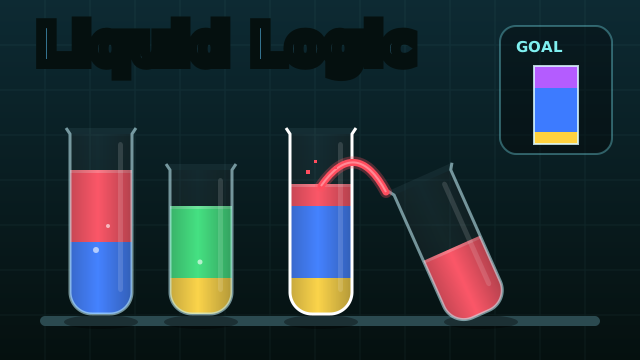
Each level puts a row of glass flasks on a lab shelf. Tap a flask to pick it up, then tap another flask to pour into it. The whole top layer moves across in one go, and the pour stops as soon as the target flask is full, so the flask sizes do the measuring for you.
A goal card shows what you need. Measuring puzzles ask for an exact amount of water in one flask, or in two flasks at once. Color puzzles ask for one flask that holds an exact stack of colored layers, shown as a small recipe flask.
Mixing, the tap and the levels
Liquids sit in layers and only the top layers touch. Pour one color onto a different one and both turn into a single new color: red and yellow make orange, yellow and blue make green, and red and blue make purple. Any other combination turns into brown mud, which no recipe asks for.
Some levels add a TAP that fills a flask to the brim with water and a DRAIN that pours away the top layer of a flask. There are 32 levels, 14 measuring puzzles and 18 color puzzles, and each one has a par number of pours. Match par for three stars, finish a few pours over it for two, and any other finish still clears the level with one. Levels unlock one after another, and the Levels button takes you back to any puzzle you have unlocked.
Tips and tricks
- In measuring puzzles the label under each flask shows how much it holds right now and how much it can hold. Pouring back and forth between a big and a small flask is how you step down to odd amounts.
- Build color recipes from the bottom up. Whatever you pour last ends up on top, and only the top layer can mix.
- Mixed colors do not mix again. Orange, green or purple poured onto anything else, or water poured onto a color, makes mud.
- The tap only fills a flask that is empty or already topped with water.
- If the game says Dead end, the goal can no longer be reached from here. Undo or reset.
- Your first undo in each level is free. After that you can watch a short ad for another undo, up to five times per level, or watch one once per level to add an empty bonus flask as big as the largest flask in the puzzle.
FAQ
Is Liquid Logic free?
Yes. It is free to play in your browser, with no download and no account.
Can I play on a phone or tablet?
Yes. Tap a flask to pick it up and tap another to pour. The lab rearranges itself to fit portrait and landscape screens.
Why did my liquid turn brown?
That is mud. Only red, yellow and blue mix into new colors, and only with each other. Any other mix makes mud, which no puzzle needs, so use Undo to take the pour back.
Is my progress saved?
Your unlocked levels and the stars you earned on each level are saved in your browser on this device.